Where Most Radio Problems Actually Start
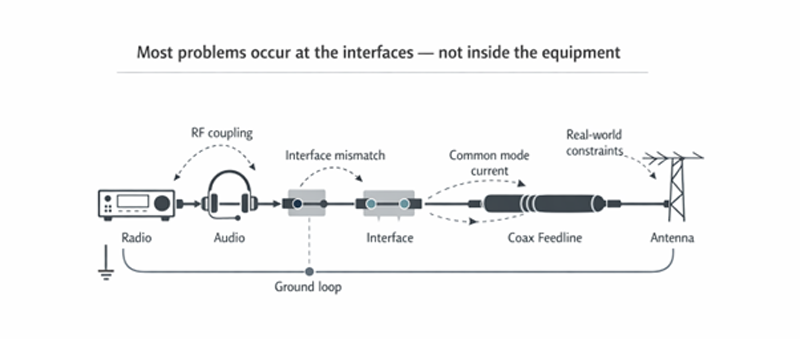
Most issues don’t originate inside a single device. They occur at the interfaces – between radios, antennas, audio paths, and grounding.
Start with the symptom that best matches what you’re seeing.
How the system connects
Most problems show up at the boundaries – where RF, audio, grounding, and feedlines interact.
What are you noticing?
Choose the symptom that best matches your setup.
RF in Your Audio
Distortion, buzzing, or RF breakthrough when transmitting.
Grounding or Noise Issues
Hum, noise, or problems that change when cables or equipment move.
Common Mode Current
RF where it shouldn’t be, equipment interaction, or choke uncertainty.
Headset or Interface Confusion
Wiring mismatches, compatibility problems, or adapter chaos.
Antenna Performance Problems
Performance that looks fine on paper but not in the real installation.
Not Sure / Mixed Symptoms
Start with the most likely failure points and work through them in order.
RF in Your Audio
If you’re hearing RF in your audio – distortion, buzzing, or your own signal breaking through – it’s almost never the radio itself.
It’s getting in through the interfaces.
Audio lines, headset wiring, and control cables can all act as unintended RF paths, especially when grounding and isolation aren’t well defined. Once RF is on those lines, the audio circuitry will happily demodulate it for you.
This is why “it works until I transmit” is such a common symptom.
The fix isn’t guessing. It’s identifying how RF is entering the audio path, then controlling that path – usually through isolation, proper grounding, or both.
If you’re swapping cables or adding ferrites without knowing why, you’re treating symptoms, not the cause.
What to do next
- Read the Audio Isolation and Grounding Guide
- Review Representative Solutions for RF and Audio Interface Problems
- If audio connections are part of the issue, see the OHIS Explainer
Grounding and Return Path Issues
A lot of “mystery noise” problems come down to the current taking paths you didn’t intend.
Every signal needs a return path. If that path isn’t controlled, it will find one – often through other equipment, cable shields, or audio connections. That’s where ground loops and unintended coupling start to show up.
This is why moving a cable or rearranging equipment sometimes “fixes” things. You’re not solving the problem – you’re just changing the path.
Good grounding isn’t about adding more connections. It’s about defining where current should flow, and making sure it doesn’t flow everywhere else.
What to do next
- Read the Audio Isolation and Grounding Guide
- Compare symptoms with RF in Your Audio
- Review practical isolation hardware if the issue involves interconnected equipment